Component Viewer utility
This is a simple kubectl utility to display information on the ODA Component deployment and lifecycle.
Installation
Requires Node.js 20 or later.
npm install @lesterthomas/kubectl-component_info -g
Then, to run plugin within kubectl:
kubectl component-info
The utility will use the current kubeconfig to connect to the Kubernetes cluster. It will show ‘No ODA Components to view’ if there are no components being deployed. If there are components, you will get a screen like the one below:
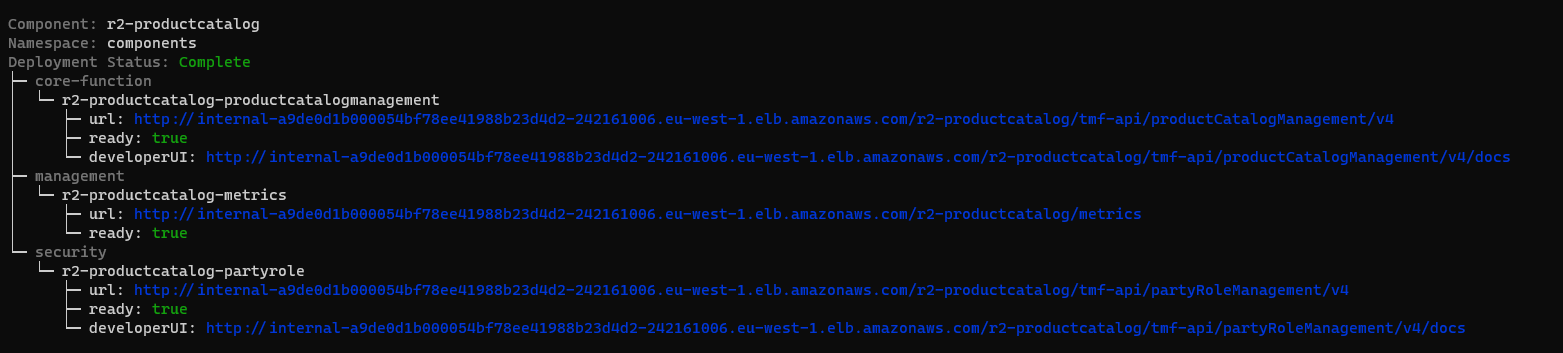
To exit the utility, type CTRL-C
Testing locally
During development, you can test the utility locally by installing the dependencies with
npm install
and running the utility against your current kubeconfig with
npm start
The component status formatting logic is in lib/componentTree.js and the Kubernetes helpers are in lib/kubernetes.js. Run the unit tests (no cluster needed) with
npm test
Publishing
To publish a new version, update the version number in the package.json file and use the command
npm publish --access public