OAuth2 EnvoyFilter Demo
Overview
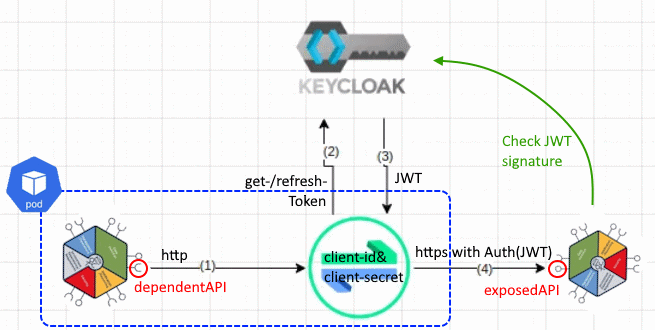
set default namespace to “components”
kubectl config set-context --current --namespace=components
remove old data
helm uninstall clientcomp
helm uninstall targetcomp
helm uninstall jedionlytarget
helm uninstall proxy-extecho


kubectl delete exposedapi externalapi-productcatalogmanagement
kubectl delete serviceentry add-https
kubectl delete destinationrule demo-b-productcatalogmanagement-downstreamproductcatalog-add-https
kubectl delete destinationrule clientcomp-echoclient-downstreamproductcatalog-add-https
kubectl delete destinationrule clientcomp-echoclient-echotarget-add-https
kubectl delete destinationrule clientcomp-echoclient-jedionlytarget-add-https
kubectl delete destinationrule clientcomp-echoclient-extecho-add-https
kubectl delete secret envoy-oauth2-secrets
kubectl delete envoyfilter demo-b-productcatalogmanagement-envoyfilter-oauth2
kubectl delete envoyfilter clientcomp-echoclient-envoyfilter-oauth2
kubectl delete configmap deps-clientcomp-echoclient
check cleanup
kubectl get serviceentries,envoyfilters,destinationrules,secrets,exposedapis,dependentapis,components -n components
Install Credentials-Management-Operator (Prerequisite)
find client-secret for client “credentialsmanagement-operator” in realm “odari”:
https://canvas-keycloak.ihc-dt.cluster-1.de/
install Credentials-Manager-Operator using helm
helm upgrade --install canvas-credman-op -n canvas charts/credentialsmanagement-operator --set=credentials.client_secret=****
show there are no existing secrets
kubectl get secrets
deploy targets
helm upgrade --install targetcomp source/operators/TMFOP008-OAuth2-Config/envoy-filter/helm/echotarget
helm upgrade --install jedionlytarget source/operators/TMFOP008-OAuth2-Config/envoy-filter/helm/jedionlytarget
helm upgrade --install proxy-extecho source/operators/TMFOP008-OAuth2-Config/envoy-filter/helm/proxy-extecho
take a short look at the sources
(optional) https://github.com/ODA-CANVAS-FORK/oda-canvas-notes/blob/main/apps/echoservice/app/app.py#L83-L110
verify credentials management works
kubectl canvaslogs deployment credentialsmanagement-operator
The secrets now exist:
kubectl get secret targetcomp-echotarget-secret -oyaml
extract secret
kubectl get secret targetcomp-echotarget-secret -ojsonpath='{.data.client_secret}' | base64 -d
compare with credentials in keycloak
check components are ready
kubectl get components
deploy client with dependent apis
helm upgrade --install clientcomp source/operators/TMFOP008-OAuth2-Config/envoy-filter/helm/echoclient
show exposedapi
kubectl get exposedapis
  NAME                                 API_ENDPOINT                                      IMPLEMENTATION_READY
  clientcomp-echoclient-echo           https://components.ihc-dt.cluster-1.de/ip         true
  jedionlytarget-jedionlytarget-echo   https://components.ihc-dt.cluster-1.de/jedionly   true
  proxy-extecho-proxy-extecho          https://echo.free.beeceptor.com                   true
  targetcomp-echotarget-echo           https://components.ihc-dt.cluster-1.de/echo       true
open endpoint in browser
log into POD
kubectl get pods -Lapp -Limpl
CLIENTCOMP_POD=$(kubectl get pods -limpl=clientcomp-echo -o=jsonpath="{.items[*].metadata.name}")
kubectl exec -it $CLIENTCOMP_POD -- /bin/bash
query target comp
curl https://components.ihc-dt.cluster-1.de/echo
GET is not allowed, use POST
curl -XPOST https://components.ihc-dt.cluster-1.de/echo
401 unauthorized
query public echo
curl https://echo.free.beeceptor.com
Mention protocol “https” and very few header attribute
curl http://echo.free.beeceptor.com
now protocol is “http” and much more header attributes with “X-Envoy-…” automatically added by Istio
injection only possible with http, because https is e2e encrypted.
Instal OAUTH2 operator
helm upgrade --install canvas-oauth2-op -n canvas charts/experimental/oauth2-envoyfilter-operator
look into logs:
kubectl canvaslogs deployment canvas-oauth2-op
look at output after “add url to dependency configmap”
kubectl get configmap deps-clientcomp-echoclient -oyaml
restart client to recognize new env vars:
kubectl rollout restart deployment clientcomp-echo
log into POD
kubectl get pods -Lapp -Limpl

CLIENTCOMP_POD=$(kubectl get pods -limpl=clientcomp-echo -o=jsonpath="{.items[*].metadata.name}")
kubectl exec -it $CLIENTCOMP_POD -- /bin/bash
look at env vars
env | grep DEP
  DEPENDENCY_URL_ECHOTARGET=http://components.ihc-dt.cluster-1.de/echo
  DEPENDENCY_URL_JEDIONLYTARGET=http://components.ihc-dt.cluster-1.de/jedionly
  DEPENDENCY_URL_EXTECHO=http://echo.free.beeceptor.com
call extecho
curl $DEPENDENCY_URL_EXTECHO
interesting: protocol “https”
echo $DEPENDENCY_URL_EXTECHO
do a call with https:
curl https://echo.free.beeceptor.com
now only the same few headers as before are set
again call with http:
curl $DEPENDENCY_URL_EXTECHO
copy token and paste into
https://developer.telekom.de/tooling/jwt
payload:
{
    "exp": 1741770728,
    "iat": 1741770428,
    "jti": "b5ece68b-034e-45f5-8f52-1f1ecf3f187c",
    "iss": "http://canvas-keycloak.canvas.svc.cluster.local:8083/auth/realms/odari",
    "aud": "account",
    "sub": "12b72716-818b-4536-997a-ff262b1fa425",
    "typ": "Bearer",
    "azp": "clientcomp-echoclient",
    "acr": "1",
    "realm_access": {
        "roles": [
            "offline_access",
            "uma_authorization",
            "default-roles-odari"
        ]
    },
    "resource_access": {
        "account": {
            "roles": [
                "manage-account",
                "manage-account-links",
                "view-profile"
            ]
        }
    },
    "scope": "email profile",
    "clientHost": "10.92.0.39",
    "clientId": "clientcomp-echoclient",
    "email_verified": false,
    "preferred_username": "service-account-clientcomp-echoclient",
    "clientAddress": "10.92.0.39"
}
payload contains issuer “iss”, authorized party “azp”, audience “aud”, expiration timestamp “exp” and also the list of realm roles
call echo target
now we can access the echo target which checks for a valid JWT
curl -XPOST $DEPENDENCY_URL_ECHOTARGET
pretty printed:
curl -s -XPOST $DEPENDENCY_URL_ECHOTARGET | jq .
jedionlytarget
the called service can check for all information provided in the payload, eg. the realm roles.
therefore we have deployed the third target
echo $DEPENDENCY_URL_JEDIONLYTARGET
http://components.ihc-dt.cluster-1.de/jedionly
lets first try to access without injection by switching to https
curl -XPOST https://components.ihc-dt.cluster-1.de/jedionly
we get a 401 with the message “error in x-gateway-token”, which makes sense, as there is no token at all.
call with token:
curl -XPOST $DEPENDENCY_URL_JEDIONLYTARGET
again we get a 401, but now with the error message “you are not a jedi”.
KeyCloak: https://canvas-keycloak.ihc-dt.cluster-1.de/auth/admin/master/console/#/odari/users select user “service-account-clientcomp-echoclient”
Role-mapping > assign role
now it may take one or two minutes, until the token is refreshed.
look at sources:
pretty print result
curl -s -XPOST $DEPENDENCY_URL_JEDIONLYTARGET | jq .
copying the JWT into the editor again
https://developer.telekom.de/tooling/jwt
now the “jedi” role is in the list.
closing
That was the live demo.
Let´s take a final look which istio/envoy objects were created by the oauth2 operator to make the magic happen:
kubectl get serviceentries,envoyfilters,destinationrules,secrets -n components
  NAME                                         HOSTS                                                          LOCATION   RESOLUTION   AGE
  serviceentry.networking.istio.io/add-https   ["components.ihc-dt.cluster-1.de","echo.free.beeceptor.com"]              DNS          62m

  NAME                                                                       AGE
  envoyfilter.networking.istio.io/clientcomp-echoclient-envoyfilter-oauth2   62m

  NAME                                                                                 HOST                             AGE
  destinationrule.networking.istio.io/clientcomp-echoclient-echotarget-add-https       components.ihc-dt.cluster-1.de   62m
  destinationrule.networking.istio.io/clientcomp-echoclient-extecho-add-https          echo.free.beeceptor.com          62m
  destinationrule.networking.istio.io/clientcomp-echoclient-jedionlytarget-add-https   components.ihc-dt.cluster-1.de   62m

  NAME                                          TYPE                 DATA   AGE
  secret/clientcomp-echoclient-secret           Opaque               2      63m
  secret/envoy-oauth2-secrets                   Opaque               1      62m
  secret/jedionlytarget-jedionlytarget-secret   Opaque               2      64m
  secret/sh.helm.release.v1.clientcomp.v1       helm.sh/release.v1   1      63m
  secret/sh.helm.release.v1.jedionlytarget.v1   helm.sh/release.v1   1      65m
  secret/sh.helm.release.v1.proxy-extecho.v1    helm.sh/release.v1   1      65m
  secret/sh.helm.release.v1.targetcomp.v1       helm.sh/release.v1   1      65m
  secret/targetcomp-echotarget-secret           Opaque               2      65m
If you are interested in the details, how the oauth2 operator works, you can take a look at the github issue #362. There is a detailed description what has to be done to manually configure istio to achieve this.
error analysis
inject error at token generation:
root@demo-b-prodcatapi-6675466b75-nrgtl:/src# curl http://echo.free.beeceptor.com/echo
Failed to inject credential.root@demo-b-prodcatapi-6675466b75-nrgtl:/src# curl http://echo.free.beeceptor.com/echo
possible issues: service-account-auth not activated, credentials in SDS not found, …
log istiod
kubectl logs -n istio-system deployment/istiod
...
2025-03-04T14:59:32.434877Z     warn    delta   ADS:LDS: ACK ERROR demo-a-prodcatapi-5988ff6d7-q8rr2.components-22 Internal:Error adding/updating listener(s) 0.0.0.0_10259: paths must refer to an existing path in the system: '/envoy_secrets/oauth2secs/demo-a-productcatalogmanagement.yaml' does not exist
0.0.0.0_9100: paths must refer to an existing path in the system: '/envoy_secrets/oauth2secs/demo-a-productcatalogmanagement.yaml' does not exist
0.0.0.0_10255: paths must refer to an existing path in the system: '/envoy_secrets/oauth2secs/demo-a-productcatalogmanagement.yaml' does not exist
...
log sidecar
kubectl logs -n components demo-b-prodcatapi-7d8c788c77-v7b9h istio-proxy
...
2025-03-04T15:35:56.042168Z     error   envoy credential_injector external/envoy/source/extensions/http/injected_credentials/oauth2/token_provider.cc:111       onGetAccessTokenFailure: Failed to get access token      thread=12
2025-03-04T15:35:56.042254Z     error   envoy credential_injector external/envoy/source/extensions/http/injected_credentials/oauth2/oauth_client.cc:74  Oauth response code: 404        thread=12
2025-03-04T15:35:56.042263Z     error   envoy credential_injector external/envoy/source/extensions/http/injected_credentials/oauth2/oauth_client.cc:75  Oauth response body: {"error":"Realm does not exist"}   thread=12
2025-03-04T15:35:56.042266Z     error   envoy credential_injector external/envoy/source/extensions/http/injected_credentials/oauth2/token_provider.cc:111       onGetAccessTokenFailure: Failed to get access token      thread=12
2025-03-04T15:35:56.042356Z     error   envoy credential_injector external/envoy/source/extensions/http/injected_credentials/oauth2/oauth_client.cc:74  Oauth response code: 404        thread=12
2025-03-04T15:35:56.042370Z     error   envoy credential_injector external/envoy/source/extensions/http/injected_credentials/oauth2/oauth_client.cc:75  Oauth response body: {"error":"Realm does not exist"}   thread=12
2025-03-04T15:35:56.042372Z     error   envoy credential_injector external/envoy/source/extensions/http/injected_credentials/oauth2/token_provider.cc:111       onGetAccessTokenFailure: Failed to get access token      thread=12